PhotoCraft: Photoshop's tools, rebuilt in Rust and given away
Adobe Photoshop costs US$22.99 a month for a single app. PhotoCraft costs nothing, runs offline, and opens the same layered PSD files. It is an image editor rebuilt from scratch in Rust by the ArtCraft team, and it is the most finished member of their seven-app family.
What it is
A native desktop image editor for Windows, macOS, Linux and FreeBSD, with a WebAssembly build that runs the same code in a browser tab. No Electron shell, no account, no upload. Open source under MIT or Apache-2.0, so you own the thing you downloaded.
What it does
- Layers, groups, clipping masks, pixel and vector masks, fill layers and alpha channels, with 27 blend modes
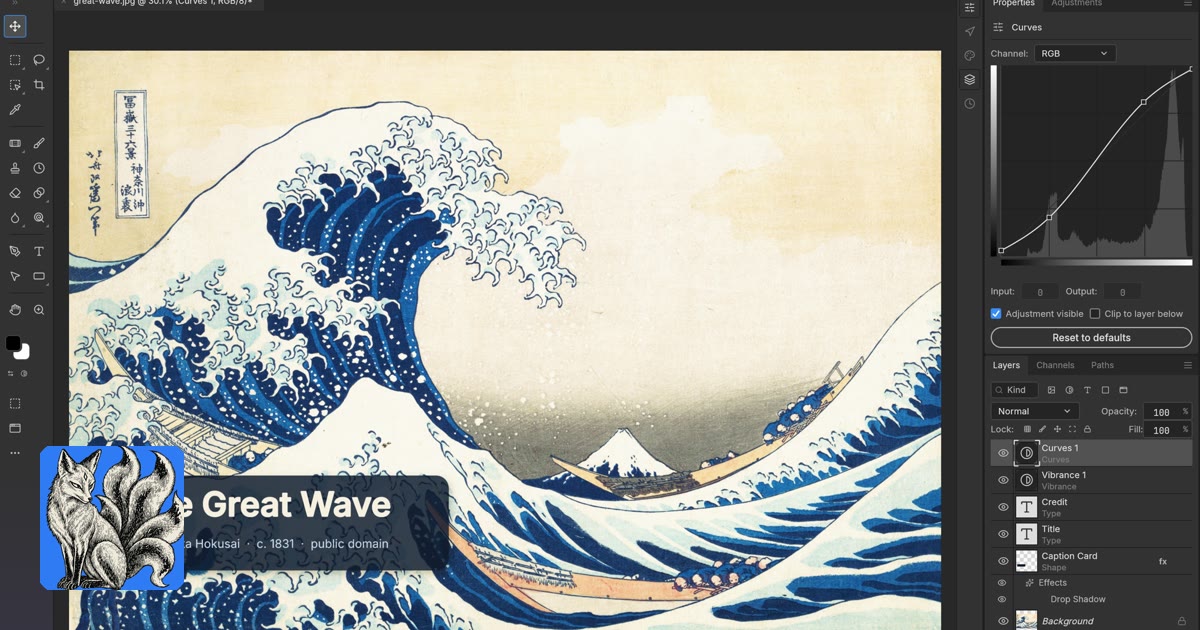
- 16 adjustment layers with live previews, including Curves with per-channel editing and Levels with a live histogram
- The full set of layer styles on any layer, type included
- Selection tools from Magic Wand to Select Subject and Select and Mask, all running on your machine
- 70+ live-preview filters, the Blur Gallery, Smart Sharpen, Reduce Noise, and Actions that record and replay
- 8, 16 and 32-bit documents in RGB, CMYK, Lab and Grayscale with ICC colour management
- Layered PSD and PSB open and save, plus
.pat pattern import and export and smart objects with smart filters
- Documents, brushes and preferences also carry across in the
.pcraft native format
Drive it from a script or an agent
Every menu item, tool and dialog runs a named command, and there are 500+ of them. The interface calls the same commands the CLI, the JSON control channel and the MCP server do, so a batch job or an AI agent can do anything you can click.
photocraft-cli run wave.psd \
  --cmd filter.sharpen.smartSharpen --params '{"amount":80}' \
  --cmd layer.newAdjustmentLayer.curves --params '{"points":[[0,0],[64,48],[192,212],[255,255]]}' \
  --out wave-final.png
Platforms and downloads
Version 0.5.0 covers Windows (x64, x86 and ARM64, installer or portable), macOS (universal disk image), Linux (AppImage, Flatpak, deb, rpm and tarball, x86_64 and ARM64), FreeBSD, a standalone headless CLI and a host-yourself web build. Every file has a published SHA-256 checksum.
Licence, in one line
MIT or Apache-2.0, at your option, for the seven apps in the Crafting family. The ArtCraft AI studio has a separate fair-source licence.
The Honest State of It
PhotoCraft calls itself early alpha and means it. Much of Photoshop's surface exists in some shape, but the project says outright that it is not yet a replacement for daily professional work: AI and generative features are missing, roughly twenty tools are absent, typography depth and professional workflows are thin, and Photoshop plug-ins do not run. Its own roadmap puts real parity well below half, and re-saving a PSD rewrites the file rather than copying it, so keep your originals.
The rest of the family
PhotoCraft ships alongside VectorCraft for Illustrator, FilmCraft for Premiere Pro, LightCraft for Lightroom, PdfCraft for Acrobat, EffectCraft for After Effects and DesignCraft for InDesign, all under the same licences and the same conventions. A GridCraft spreadsheet is in the works.
Read the full review
The longer piece covers all seven apps one by one, including each project's own parity figures, how PhotoCraft compares to Photoshop on price and file fidelity, and the exact commands to build it from source.
Read the full ArtCraft review