The Best Background Remover (Free): RMBG-2 on Pinokio
How to Remove Backgrounds for Free Using RMBG 2.0 on Pinokio (No Code Required)
If you work in e-commerce, digital marketing, graphic design, or content creation, background removal is something you deal with almost every day. Whether it is isolating a product on a white background, preparing a headshot for a banner ad, or creating composite images for social media, the task is repetitive, time-consuming, and — if you rely on tools like remove.bg or Canva Pro — surprisingly expensive at scale.
The good news is that the best background removal model available right now is completely free, runs locally on your own machine, and can be installed in a few clicks without touching a single line of code. It is called RMBG 2.0, and when paired with the Pinokio launcher, it becomes one of the most powerful additions to any visual content workflow.
What Is RMBG 2.0?
RMBG 2.0 is an open-source background removal model developed by BRIA AI. It represents a significant leap forward in AI-powered image segmentation, achieving a 90.14% overall success rate on benchmark tests — up from 73.26% on the previous version, and outperforming industry-standard paid tools like remove.bg on the same benchmarks.
Unlike older background removal models that produce binary masks (a hard-edged, pixel-is-either-on-or-off cutout), RMBG 2.0 uses non-binary alpha masks with 256 levels of transparency. This means edges are smooth, gradual, and natural-looking. Hair strands, soft fabric, transparent glass, and partially translucent objects are handled with precision that previously required manual Photoshop masking or expensive professional software.
The model is built on the BiRefNet architecture, which combines two key modules:
A Localization Module (LM) that generates semantic maps to identify what the foreground subject is
A Restoration Module (RM) that refines the foreground boundary at a fine-detail level to produce clean, accurate masks
The result is a model that achieves state-of-the-art (SOTA) performance across photorealistic images, complex backgrounds, products, portraits, and more — and it is available for free under an open licence.
What Is RMBG-2-Studio?
RMBG-2-Studio is a lightweight, open-source application built around the BRIA RMBG 2.0 model. Rather than running the model from a terminal or integrating it into a Python pipeline, RMBG-2-Studio wraps the model in a clean, browser-based Gradio interface that makes it accessible to anyone — no coding experience required.
It handles the full background removal and replacement workflow in one place, with several features that make it genuinely useful for day-to-day creative work.
Key Features of RMBG-2-Studio
Pro-Level Masking
The BRIA RMBG 2.0 model at its core generates masks with 256 levels of transparency, producing soft, natural-looking edges rather than the harsh, jagged cutouts common with older tools. Even difficult subjects like flyaway hair, fur, and semi-transparent objects are handled cleanly.
Drag-and-Drop Gallery
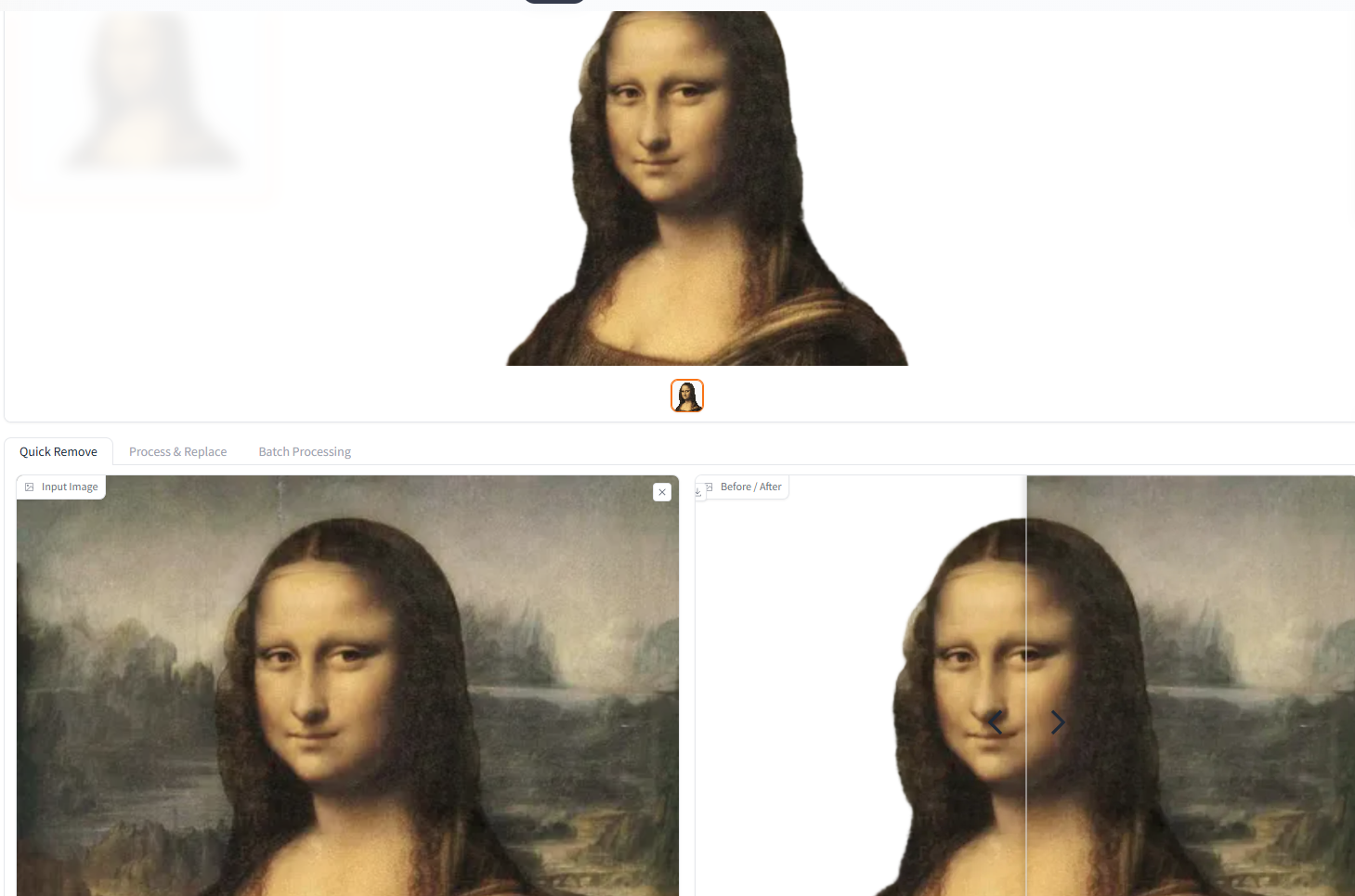
A built-in gallery at the top of the interface lets you upload, view, and manage images. Once a background is removed, you can drag the processed cutout directly into the composition panel without ever leaving the app or touching a file manager.
Integrated Background Composition
RMBG-2-Studio is not just a removal tool — it is a basic compositor. You can drop your extracted foreground onto a new custom background directly within the interface, skipping the round-trip to Photoshop, GIMP, or Canva for simple replacements.
Built-In Colour Grading
After compositing, you can adjust the brightness, contrast, saturation, and colour temperature of the result to ensure the foreground blends naturally with the new background. This is particularly useful for product photography where lighting consistency matters.
LoRA Mask Export
For AI practitioners and model trainers, community modifications to RMBG-2-Studio allow you to generate and export segmentation masks optimised for training LoRA models in pipelines like OneTrainer. This makes the tool useful beyond just visual asset creation.
Why Run It Locally?
Most background removal tools work by uploading your images to a cloud server, processing them remotely, and returning the result. This introduces several problems:
Cost: Services like remove.bg limit free users to 50 images per month, and paid API plans add up quickly for high-volume users.
Privacy: Every image you upload leaves your machine. For client work, product launches before announcement, or any sensitive imagery, this is a real concern.
Dependency: If the service goes down, changes its pricing, or restricts your account, your workflow breaks.
Speed: Cloud processing depends on internet speed, server load, and API rate limits. Local processing is bound only by your hardware.
Running RMBG 2.0 locally eliminates all of these problems. Your images never leave your computer, there are no per-image fees, no monthly credit limits, and no dependency on a third-party service staying operational.
What Is Pinokio?
Pinokio is a free, open-source universal launcher for AI applications. Think of it as the Steam for local AI tools — a desktop app that lets you discover, install, and run complex AI environments with a single click, without ever needing to configure Python environments, install CUDA dependencies, or run terminal commands.
Under the hood, Pinokio handles everything: it clones the GitHub repository, sets up the virtual environment, installs all dependencies, and downloads the required model weights automatically. For users who are not developers, this is what makes tools like RMBG-2-Studio genuinely accessible rather than technically possible in theory but frustrating in practice.
Pinokio is available for Windows, macOS, and Linux.
System Requirements
RMBG-2-Studio is intentionally lightweight compared to large generative AI models like Stable Diffusion or Flux. The entire installation footprint is approximately 6 GB, which is modest by local AI standards.
The tool runs well on mid-range modern hardware. Testing on an Nvidia RTX 4060 Ti with 16 GB of VRAM showed consistent results with backgrounds removed in under 10 seconds per image, with exceptional edge quality on complex subjects including hair and glass. You do not need a high-end workstation — a gaming GPU from the past few years will handle it comfortably.
For CPU-only setups, processing will be slower but still functional, making RMBG-2-Studio accessible even without a dedicated GPU.
How to Install RMBG-2-Studio on Pinokio: Step-by-Step
Getting RMBG-2-Studio running is a straightforward process. Here is how to do it from scratch:
Step 1: Download and Install Pinokio
Go to pinokio.co/download.html and download the version for your operating system. Install it as you would any desktop application.
Step 2: Open Pinokio and Find RMBG-2-Studio
Launch Pinokio. You can either search for "RMBG-2-Studio" using the built-in search, or navigate directly to the RMBG-2-Studio app page and click the link to open it in Pinokio.
Step 3: Click "Install Latest"
On the app page, click the Install Latest button. Pinokio will take over from here — it clones the GitHub repository, sets up the Python environment, and downloads the BRIA RMBG 2.0 model weights from Hugging Face automatically. No terminal required.
Step 4: Launch the App
Once installation is complete, click Start. The Gradio web interface will open in your default browser at a local address (typically http://127.0.0.1:7860 or similar). You are now running RMBG 2.0 locally.
Step 5: Remove Your First Background
Drag and drop an image into the input panel. The model will process it and display the result with the background removed. From there, you can use the gallery, the compositor, and the colour tools to finish your image — all without leaving the browser.
Real-World Use Cases
E-commerce Product Photography
Remove cluttered backgrounds from product photos and place them on clean white or branded backgrounds. With no per-image cost and fast local processing, this scales to entire product catalogues without budget concerns.
Marketing and Advertising Assets
Isolate subjects from stock photos or original photography for banners, ads, and social graphics. The compositing tools let you drop subjects onto new backgrounds directly in the interface.
Social Media Content
Create polished profile pictures, thumbnails, and visual content with clean subject cutouts and custom backgrounds.
AI Training Data Preparation
Generate precise segmentation masks for custom LoRA training datasets using the mask export functionality — a workflow that would otherwise require manual annotation or expensive tooling.
Client Work and Agency Use
Because all processing is local, client images never leave your machine. This matters for NDAs, pre-launch campaigns, and any situation where image confidentiality is a requirement.
How Does It Compare to Paid Alternatives?
Tool | Free Tier | Local Processing | Privacy | Cost at Scale |
|---|---|---|---|---|
RMBG-2-Studio (local) | Unlimited | Yes | Full | Free |
remove.bg | 50 images/month | No | Cloud | $108+/year |
Canva Pro | Limited | No | Cloud | $156/year |
Adobe Express | Limited | No | Cloud | Subscription |
Cutout.pro | 5 credits | No | Cloud | $2.99+ |
For individual creators, freelancers, and small agencies handling moderate-to-high image volumes, the cost savings alone make local RMBG 2.0 compelling. Add in the privacy benefits and the removal of credit limits, and it becomes difficult to justify a paid subscription for background removal as a standalone need.
Final Verdict
RMBG-2-Studio on Pinokio is the most practical free background removal setup available for desktop users right now. The model quality is genuinely state-of-the-art, the Pinokio installation process is as close to frictionless as local AI gets, and the built-in composition and colour tools make the full workflow self-contained.
If you regularly pay for background removal credits — or if you have been making do with lower-quality free tools because the good options cost money — this is worth an hour of your time to set up. It runs locally, it is free forever, and it produces results that stand up against any paid alternative on the market.
Download Pinokio, install RMBG-2-Studio, and stop paying per cutout.
RMBG-2-Studio is available on GitHub. The underlying BRIA RMBG 2.0 model is hosted on Hugging Face.