
Flameshot
Flameshot is a free, open-source screenshot tool with in-app editing, annotations and a command-line interface. Capture, mark up and share in seconds.
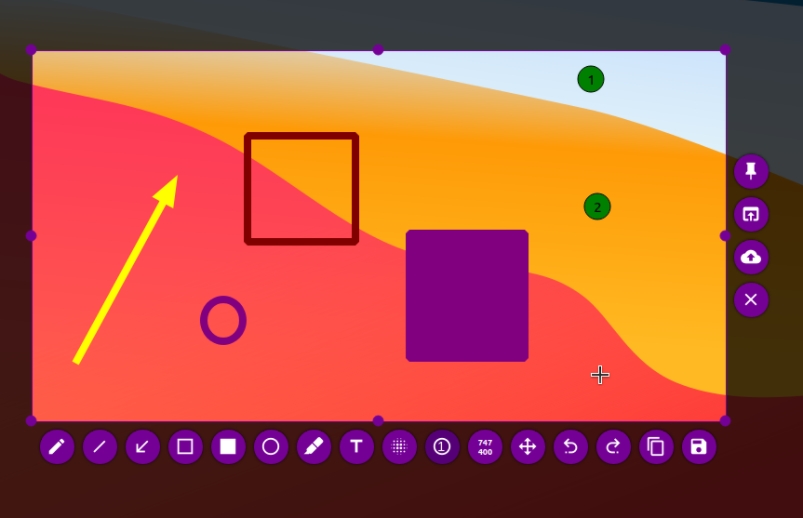
Flameshot is a powerful yet simple open-source screenshot tool for Windows, macOS and Linux. It lets you capture your screen and immediately annotate, edit and share the result without leaving the app.
Why Flameshot stands out
- In-app editing - Draw arrows, boxes, text, highlights and blur sensitive areas right after you capture. No need to open a separate editor.
- Highly customizable - Configure keyboard shortcuts, the UI and the capture behavior to fit your workflow.
- Command-line interface - Script screenshots and automate captures with the CLI, perfect for power users and developers.
- Open source - GPL-3.0 licensed with over 30,000 GitHub stars. Free forever, no accounts, no watermarks.
- Cross-platform - Works on Windows, macOS and Linux.
Where Flameshot falls short
- No built-in cloud upload - You can save locally or copy to clipboard, but there's no one-click upload to a hosting service built in.
- macOS support is less polished - The Linux and Windows versions are the most mature; macOS can feel a step behind.
- No video recording - Flameshot is screenshots only. If you need screen recording, pair it with a separate tool like OBS Studio.
- Learning curve for advanced features - The basics are simple, but unlocking the full customization and CLI takes some reading.
Platforms
Windows, macOS and Linux. Free and open source (GPL-3.0).